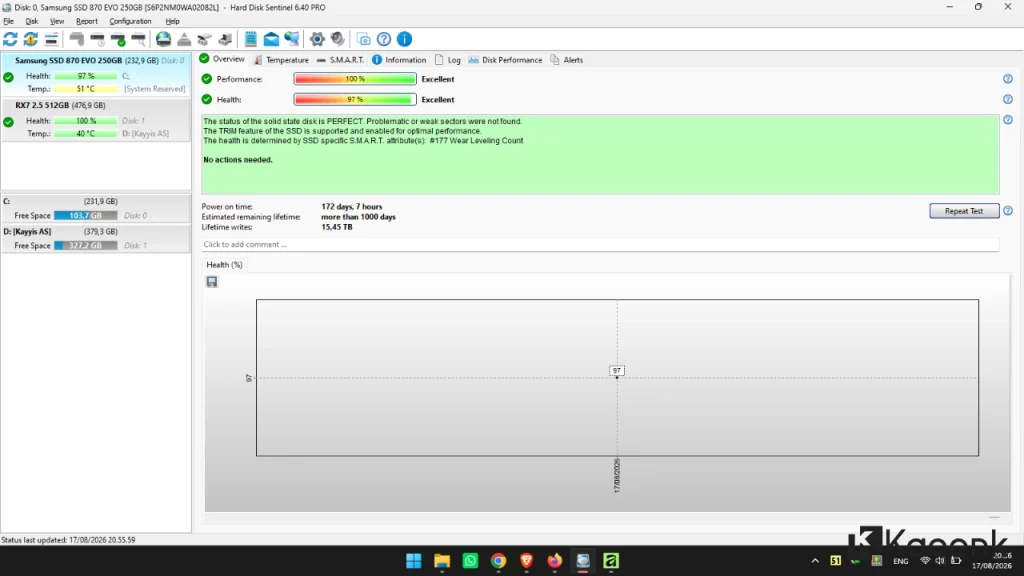
Download Hard Disk Sentinel – HDD and SSD Health Monitoring Tool

If you are looking for a reliable tool to monitor the health and performance of your hard drive or SSD, Hard Disk Sentinel is one of the most comprehensive solutions available. In our previous post, we shared a guide to Download CrystalDiskInfo, another popular tool for checking storage health. This time, we are providing information about Download Hard Disk Sentinel and its available editions.
In today’s digital world, data is one of the most valuable assets. A failing hard drive or SSD can result in serious data loss, including documents, photos, videos, and other important files that may be impossible to recover. For this reason, monitoring the condition of your storage devices regularly is an important part of maintaining a reliable computer system.
Hard Disk Sentinel is designed to help users monitor HDD and SSD health, detect potential problems at an early stage, and keep track of storage performance. Its detailed monitoring and diagnostic features make it useful for home users, IT professionals, and server administrators.
Download Hard Disk Sentinel
You can download Hard Disk Sentinel from its official website. The software is available in several editions, allowing users to choose a version based on their needs.
Official Website: Hard Disk Sentinel
Available Versions
Hard Disk Sentinel Professional Edition (v6.40.3)
The Professional Edition provides the most complete set of features, including advanced monitoring, detailed diagnostics, alerts, and support for portable and installer versions. It is suitable for both individual users and professional environments.
Hard Disk Sentinel Standard Edition
The Standard Edition is a lighter option that provides essential functions for monitoring and checking the condition of storage devices.
Hard Disk Sentinel Enterprise Server
This edition is designed for organizations that need to monitor multiple computers or storage devices across a network.
Hard Disk Sentinel Trial Version
The trial version allows users to test the software and explore its features before deciding whether to purchase a full license.
Hard Disk Sentinel for Linux and DOS
Hard Disk Sentinel is also available for Linux and DOS environments, providing storage monitoring capabilities outside the Windows platform.
Alternative Download Links
If you are unable to access the main download page, you can use an alternative download source when available.
For security reasons, always verify that the downloaded installer comes from a trusted and official source.

Hard Disk Sentinel System Requirements and Compatibility
Hard Disk Sentinel supports a wide range of operating systems and storage devices, making it suitable for both older computers and modern systems.
Supported Operating Systems
- Windows XP through Windows 11
- Windows Server 2016 through Windows Server 2025
- Linux
- DOS
Architecture
- x86 (32-bit)
- x64 (64-bit)
Minimum Requirements
- RAM: 512 MB or more
- Available disk space: approximately 50 MB
Actual requirements may vary depending on the operating system, edition, and features being used.
Key Features of Hard Disk Sentinel
Hard Disk Sentinel offers many features designed to provide detailed information about the condition of HDDs and SSDs.
1. Real-Time Drive Monitoring
The software can monitor important storage information in real time, including drive temperature, health status, performance, and S.M.A.R.T. attributes.
This information can help users identify warning signs before a storage device completely fails.
2. Automatic Alerts
Hard Disk Sentinel can notify users when a potential problem is detected. Depending on the configuration, notifications may include pop-up messages, sounds, email alerts, and network notifications.
This feature can be particularly useful for computers and servers that need continuous monitoring.
3. Disk Performance and Transfer Speed Tests
The built-in performance and benchmark features can be used to evaluate storage transfer speeds and identify possible performance degradation.
By comparing performance over time, users may be able to identify changes that could indicate an issue with their storage device.
4. Wide Storage Device Support
Hard Disk Sentinel supports a wide variety of storage technologies and configurations, including:
- HDDs
- SATA SSDs
- NVMe SSDs
- SSHDs
- RAID systems
- NAS storage
- USB storage devices
- Memory cards and other compatible storage media
The exact features available may depend on the hardware, controller, interface, and operating system.
5. Detailed S.M.A.R.T. Information
S.M.A.R.T. (Self-Monitoring, Analysis and Reporting Technology) information provides valuable data about the condition of compatible storage devices.
Hard Disk Sentinel presents this information in a user-friendly format, helping users understand important indicators related to drive health and reliability.
6. Advanced Diagnostic Tools
For users who need more than basic health information, Hard Disk Sentinel provides additional diagnostic and testing functions. These tools can help identify potential problems and provide more detailed information about the storage device.
Why Should You Monitor Your HDD or SSD?
Storage devices can deteriorate over time, and a drive may sometimes show warning signs before a complete failure occurs. Monitoring your HDD or SSD regularly can give you an opportunity to back up important files and replace a problematic drive before it becomes unusable.
A storage monitoring application is especially useful if your computer contains important work files, personal photos, business documents, databases, or other irreplaceable data.
However, drive health monitoring should not replace regular backups. Even a drive that appears healthy can fail unexpectedly.
Important Tips Before Using Hard Disk Sentinel
Before downloading and using Hard Disk Sentinel, keep the following tips in mind:
Download From a Trusted Source
Always download the software from the official Hard Disk Sentinel website or another reputable source. Avoid suspicious websites that distribute modified installers or bundled software.
Consider the Portable Version
If you do not want to install the application, the portable version can be a convenient option for checking storage devices on different computers.
Back Up Important Data
If Hard Disk Sentinel reports that a drive has a warning or bad health status, immediately back up important files to another storage device or a trusted backup service.
Do not wait for the drive to fail before making a backup.
Monitor Drive Temperature
High operating temperatures can negatively affect storage devices. Regularly checking the temperature can help you identify cooling problems or unusual operating conditions.
Hard Disk Sentinel vs. CrystalDiskInfo
Both Hard Disk Sentinel and CrystalDiskInfo can be useful for monitoring storage health, but they have different approaches and feature sets.
CrystalDiskInfo is well known for providing straightforward S.M.A.R.T. information and basic drive health monitoring. Hard Disk Sentinel, on the other hand, offers a broader collection of monitoring, diagnostic, performance testing, and alert features.
If you only need basic S.M.A.R.T. information, CrystalDiskInfo may be sufficient. If you want more extensive monitoring and diagnostic capabilities, Hard Disk Sentinel is worth considering.
Frequently Asked Questions
What is Hard Disk Sentinel?
Hard Disk Sentinel is a storage monitoring and diagnostic application designed to monitor the health, temperature, performance, and reliability of HDDs and SSDs.
Is Hard Disk Sentinel free?
Hard Disk Sentinel offers different editions and trial options. Some versions provide limited functionality, while the Professional Edition includes more advanced features.
Can Hard Disk Sentinel check SSD health?
Yes. Hard Disk Sentinel supports many types of SSDs and can display health, temperature, performance, and S.M.A.R.T.-related information when supported by the device.
Does Hard Disk Sentinel support NVMe SSDs?
Yes, compatible NVMe SSDs are supported. However, the information available can vary depending on the SSD controller, firmware, operating system, and hardware configuration.
Can Hard Disk Sentinel prevent hard drive failure?
No software can guarantee that a hard drive or SSD will never fail. Hard Disk Sentinel can help detect warning signs and provide useful information, allowing users to take preventive action such as backing up data or replacing a problematic drive.
Should I use Hard Disk Sentinel together with a backup?
Yes. Drive monitoring and backups serve different purposes. Monitoring can help detect potential problems, while backups protect your data if the storage device fails unexpectedly.
Conclusion
Hard Disk Sentinel is a comprehensive HDD and SSD monitoring tool that provides detailed information about storage health, temperature, performance, and S.M.A.R.T. status. Its monitoring, diagnostic, benchmark, and alert features make it useful for both everyday computer users and professional IT environments.
If you want to download Hard Disk Sentinel, choose the edition that best matches your requirements and always obtain the software from a trusted source. Most importantly, remember that storage monitoring is only one part of data protection. Regular backups are still essential for protecting important files against unexpected hardware failure.
For users who want a powerful solution for monitoring HDD and SSD health, Hard Disk Sentinel is a valuable tool to keep an eye on the condition and performance of their storage devices.
