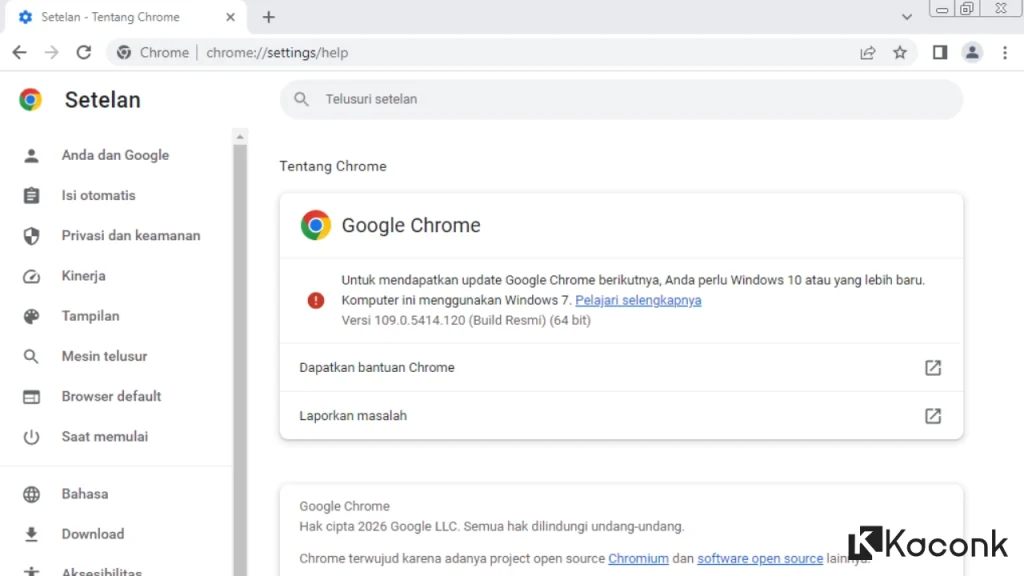
Download Google Chrome for Windows 7

Looking for Google Chrome for Windows 7? Although Google no longer supports Windows 7, you can still install and use the last compatible version of Chrome, which is Google Chrome 109.
Google Chrome is one of the most popular web browsers, known for its fast performance, simple interface, and support for a wide range of websites and web applications. For users who still have an older computer running Windows 7, Chrome 109 provides a way to continue using Google Chrome without upgrading to a newer version of Windows.
Google Chrome for Windows 7
Google officially ended support for Windows 7 and Windows 8 with the release of Chrome 110. Therefore, Google Chrome 109 is the last version that supports Windows 7.
If you are still using Windows 7 and want to keep Google Chrome as your primary browser, you can download Chrome 109 using the links below.
Download Google Chrome for Windows 7
If you are looking for an older version of Google Chrome that works with Windows 7, Chrome 109.0.5414.120 is the final compatible release.
Use the appropriate download link based on your Windows 7 system:
Google Chrome 109 for Windows 7 32-bit
Google Chrome 109 for Windows 7 64-bit
Make sure you select the correct version before starting the installation.
Google Chrome 109 System Requirements
- Software: Google Chrome
- Version: 109.0.5414.120
- Operating System: Windows 7 SP1
- Architecture: 32-bit / 64-bit
- Installer: Offline Installer

Google Chrome 109 for Windows 7 Offline Installer
The download provided on this page is an offline installer, which allows you to install Google Chrome without requiring an active internet connection during the installation process.
This can be especially useful if you need to install Chrome on multiple Windows 7 computers or on a computer with limited internet access.
Before installing Chrome 109, make sure your computer is running Windows 7 Service Pack 1 (SP1). If you are using an earlier version of Windows 7 without SP1, the installation may fail or the browser may not work correctly.
Why Is Chrome 109 the Last Version for Windows 7?
Google Chrome 109 is the final version compatible with Windows 7 and Windows 8. Starting with Chrome 110, Google requires a newer version of Windows.
This means that Windows 7 users cannot officially upgrade to Chrome 110 or later. If you attempt to install a newer Chrome version on Windows 7, the installation may not be supported.
For this reason, Chrome 109 remains the last option for users who want to use Google Chrome on Windows 7.
Can You Still Use Google Chrome on Windows 7?
Yes. Google Chrome 109 can still be installed and used on Windows 7 SP1.
However, it is important to understand that Chrome 109 is no longer supported by Google and does not receive newer security updates or feature updates. Modern websites may also eventually require browser features that are not available in this older version.
If you continue using Windows 7, you should consider upgrading to a supported operating system whenever possible.
How to Install Google Chrome on Windows 7
Installing Chrome 109 on Windows 7 is relatively simple. Follow these steps:
- Download the appropriate Google Chrome 109 installer for your Windows 7 architecture.
- Make sure you are using Windows 7 SP1.
- Open the downloaded installer file.
- Follow the instructions shown on the screen.
- Wait until the installation process is complete.
- Launch Google Chrome from the Start Menu or desktop shortcut.
Because this is an offline installer, an internet connection is not required during the installation process.
Windows 7 32-bit vs. 64-bit
Before downloading Chrome, you should check whether your Windows 7 system is running a 32-bit or 64-bit architecture.
If your computer uses a 32-bit version of Windows 7, download the 32-bit installer. For a 64-bit version of Windows 7, use the 64-bit installer.
You can check your system architecture by opening Control Panel → System and Security → System and looking for the System type information.
Frequently Asked Questions
What is the latest version of Chrome for Windows 7?
Google Chrome 109 is the last version of Chrome compatible with Windows 7.
Does Chrome 109 work on Windows 7 SP1?
Yes. Chrome 109 can be installed on Windows 7 SP1.
Can I install Chrome 110 on Windows 7?
No. Chrome 110 and newer versions require a supported version of Windows. Chrome 109 is the final Chrome release for Windows 7.
Is Google Chrome 109 still receiving updates?
No. Chrome 109 is an older version and no longer receives regular security or feature updates from Google.
Is Chrome 109 an offline installer?
Yes. The installer provided on this page is an offline installer, allowing you to install Chrome without an internet connection during setup.
Conclusion
Google Chrome 109.0.5414.120 is the last version of Google Chrome available for Windows 7. If you still use Windows 7 SP1 and want to continue using Chrome, you can download the 32-bit or 64-bit offline installer from the links above.
Keep in mind that Chrome 109 is an outdated browser and is no longer supported by Google. For better security, compatibility, and performance, upgrading your computer to a supported version of Windows is recommended.
For users who need to keep Windows 7 for compatibility with older hardware or software, however, Chrome 109 remains a practical option for basic web browsing.
